Voice GPS Map Navigation Route
- 4.6
- Rating
- 100.00K
- Installs
- Free
- Price
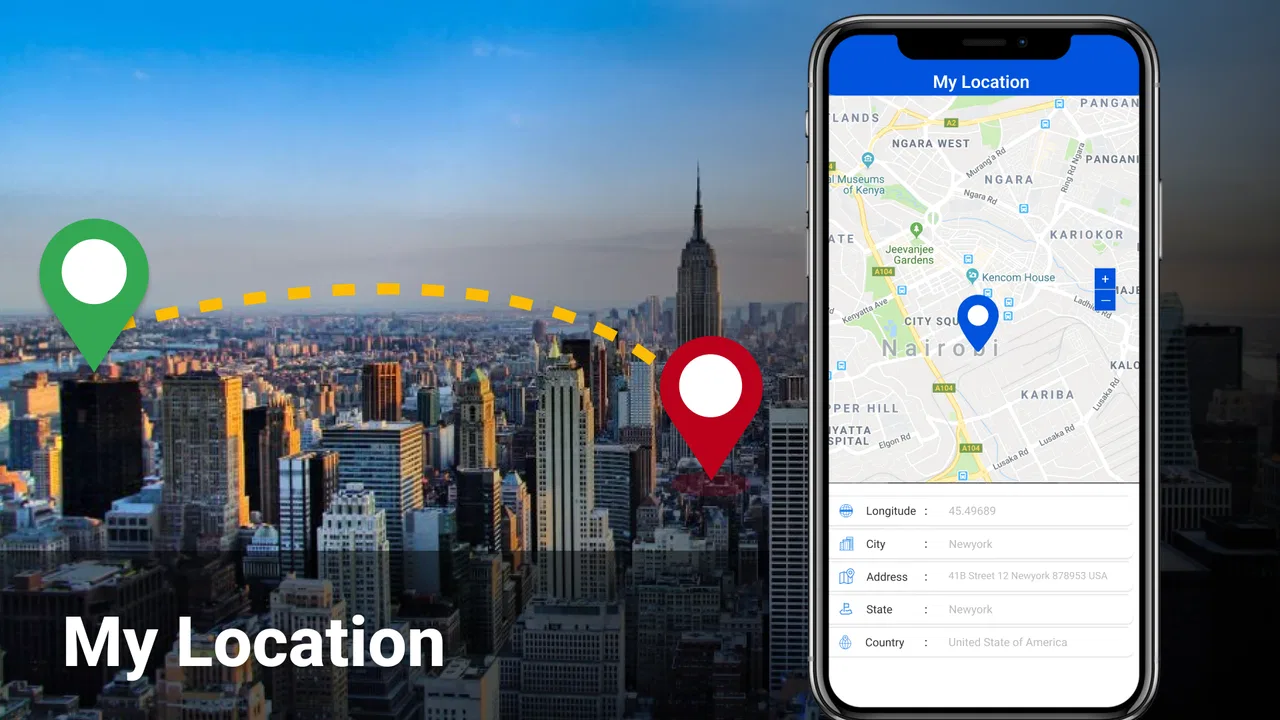
 Analysis by App-foxy
Voice GPS Map Navigation Route is the kind of navigation app I would try when I want spoken directions without turning a journey into a complicated setup process. Its central appeal is simple: it combines a map view with voice-guided routing, live Earth map imagery, and traffic information in one Android app. I found that focus more useful than a long list of extra tools, because navigation is usually at its best when I can glance at the screen, listen to the next instruction, and keep my attention on the road.
The app is developed by Galaxy studio apps and sits in the Maps & Navigation category. It is free to install, rated for Everyone, and has reached over 100 thousand installs. Its average score is 4.6 from around 900 ratings, which suggests that many users find the basic experience worthwhile. I would still treat those figures as a starting point rather than a guarantee: navigation depends heavily on the quality of map coverage, traffic information, phone hardware, and the conditions of a particular trip.
Voice guidance is the feature that changes the whole experience
The most important part of this app is not simply showing where I am. Many map applications can do that. The real difference is the attempt to turn a route into spoken instructions, so I do not need to keep checking the display for every turn. When the voice guidance is clear and timed well, it makes the phone feel more like a quiet co-driver than a map I have to operate constantly.
You May Also Like

 Blood Strike: 2.5 Anniversary
Blood Strike’s Loadouts Turn Every Drop Into a Tactical Gamble
A close look at Blood Strike’s custom loadouts: how fast access to signature weapons reshapes its battle royale rhythm, rewards preparation, and narrows the gap between fights.

 Pandora - Music & Podcasts
Pandora’s Music Is Easy to Start, but Harder to Recover
Pandora’s strength is its low-effort path from a seed to a station. Its weak spot is how much confidence it asks you to place in connection, setup, and quiet recovery.

 8 Ball Pool
 Is Built on Rivalries, Rematches, and Routine
A close look at the rivalries, rematches, shared routines, and unanswered safety questions that turn a quick pool match into a persistent mobile community.

 Samsung Music
’s Quiet Strength Is Playing What You Already Own
Its reach comes less from spectacle than from dependable access to a personal library. That simplicity is both the app’s strongest retention engine and its ceiling.

 AccuWeather: Weather Radar
AccuWeather Review: A Quick, Clear Forecast for Everyday Decisions
For everyday plans, the best forecast is the one you can understand quickly. AccuWeather makes rain timing, radar, and local conditions easy to act on, with a few trade-offs.

 Hill Climb Racing
Why Hill Climb Racing Still Turns Crashes Into One More Run
A tiny car, a bumpy hill and one more upgrade: Hill Climb Racing keeps resurfacing because its simple chaos makes every near-miss feel personal.
More From Our News Desk



That matters most when I am driving through an unfamiliar area. A visual route can be easy to understand while sitting still, yet much harder to follow when traffic is moving, lanes divide, and signs appear quickly. Voice prompts reduce the number of moments when I need to look down. I still use the map to confirm the general direction, but I can rely on the audio cue for the next action.
In my experience, spoken navigation is also useful outside long road trips. I can imagine using it for a short drive to a new medical clinic, a meeting in another neighborhood, or a shop I have never visited. The route does not need to be dramatic to benefit from hands-free instructions. In fact, short unfamiliar journeys are where I am most likely to make a wrong turn because I assume I will remember the way.
The practical value of voice navigation is not that it replaces the map; it reduces how often I need to interact with the map while moving. That is an important distinction. I would not blindly follow any navigation application, and I would always pay attention to road signs and local conditions. The app is a guide, not a substitute for judgment.
What the map view adds beyond spoken directions
The visual side remains useful because voice instructions can sometimes sound similar at complicated intersections. A quick look at the route can help me understand whether the next turn is part of a larger junction, whether I should stay on the current road, or whether the route is bending around a block rather than making a direct turn. The combination of audio and visual context is more dependable than either one alone.
The live Earth map presentation gives the app a more recognizable sense of place than a purely abstract line on a blank background. I find that especially helpful when planning the final part of a journey. Seeing the surrounding area can make it easier to identify a large road, a park, or another visible landmark before I arrive. It is not a replacement for signs, but it can make the route feel less detached from the real environment.
Traffic updates are another important part of the experience. Their usefulness depends on how current and complete the information is in the area where I am traveling, so I would not assume every delay is represented perfectly. Still, having traffic conditions considered during a route is valuable when a familiar trip suddenly becomes slower than expected. It can help me decide whether leaving earlier is sensible or whether an alternative route deserves a look.
How I would use it before and during a journey
I would begin by preparing the route before moving, rather than trying to make several changes while driving. This is a small habit, but it makes a noticeable difference. I would check the destination, look at the overall path, and make sure the phone is positioned where I can hear the guidance without needing to hold it. The point of a voice-led app is defeated if I have to keep touching the screen to correct basic setup choices.
Before starting, I would also inspect the route visually instead of accepting the first line automatically. That quick review can reveal whether the suggested path takes me through a busy central area, uses roads I already know are awkward, or approaches the destination from an inconvenient side. Even if I ultimately keep the suggested route, understanding its shape makes the spoken prompts easier to interpret.
Once moving, I would use the map as a confirmation tool. I would listen for the next instruction, glance only when safe, and avoid repeatedly zooming or dragging the display. This is one of the less obvious ways to get more from the app: the best workflow is not constant interaction. Voice guidance works better when I let it handle the rhythm of the trip and reserve the screen for moments that genuinely need visual clarification.
For a realistic everyday example, imagine leaving work for a friend’s new apartment during the evening rush. I know the general district but not the final streets. I would set the destination while parked, check the route and traffic view, then begin with the voice instructions active. When the traffic becomes slower than expected, the traffic information gives me a reason to reconsider the route rather than assuming I am simply having a bad journey. Near the apartment, I would use the map view to understand the last turns and confirm that I am approaching the correct block.
A useful routine for unfamiliar destinations
For places I have never visited, I would save a few seconds before departure to study the final approach. The last part of a route is often more confusing than the highway or main road section. Buildings, one-way streets, entrances, and divided roads can make a destination feel close while still requiring several decisions. Voice prompts can tell me when to turn, but the map helps me form a mental picture of what comes after that turn.
I would also keep the phone charged for longer journeys and avoid treating traffic information as a promise of perfect arrival timing. Those are not faults unique to this app; they are sensible precautions for any phone-based navigation tool. The more important point is that Voice GPS Map Navigation Route is most comfortable when used as part of a prepared driving routine, not as something I start experimenting with in the middle of a complicated junction.
The current version is 2.1.0, and the app runs on Android 6.0 or later. That broad compatibility makes it approachable for people who do not own a recent phone. On older hardware, however, I would be realistic about performance. Map rendering, location updates, voice playback, and traffic information can place different demands on a device. If the phone already struggles with other navigation apps, this one may not transform that hardware into a modern navigation unit.
The situation where it makes the strongest case
I think the app is at its best for drivers who want straightforward spoken route guidance but still like having a visual map available. It suits a person who regularly travels around an unfamiliar city, visits clients in different neighborhoods, or takes occasional weekend drives without wanting to learn a complex navigation system. The voice feature is especially valuable when the destination changes during the day and I need directions quickly after pulling over safely.
It can also help newer drivers build confidence in unfamiliar areas, provided they continue to watch the road and follow signs. Hearing the next instruction can be less distracting than repeatedly searching the map for the next turn. For passengers, the visual map offers a shared reference: someone else can check the route while the driver concentrates on driving, rather than both people trying to interpret a tiny screen at once.
Another good use is route checking before a journey rather than live turn-by-turn driving. I might use the map and traffic view to compare the general shape of a trip, estimate where delays could affect me, and decide whether the route feels sensible. The app’s value is not limited to the moment when the car is moving; it can also support a calmer decision before departure.
That said, I would not choose it automatically for every navigation need. If I require a very mature ecosystem of location sharing, transit planning, cycling tools, offline maps, or deep integration with other services, a larger established mapping platform may be a better fit. Voice GPS Map Navigation Route makes a clearer case when the priority is spoken road guidance with map and traffic context, not when I want one application to manage every kind of travel.
Why the voice-first approach can be better than a standard map
A conventional map application often gives me more information than I need at the exact moment I need to turn. Extra labels, business listings, recommendations, and interface controls can be useful in other situations, but they may also compete for attention during a drive. This app’s appeal is that its core purpose feels easier to understand: find a route, show the surroundings, and tell me what to do next.
The trade-off is that simplicity can feel limiting if I expect a complete travel assistant. I would not install it solely because it has a map; I would install it because the voice-led experience matches the way I travel. That distinction helps avoid disappointment. A user who wants a focused driving companion may appreciate the restraint, while someone looking for a broad location platform may notice the missing depth compared with familiar alternatives.
Trade-offs I noticed before making it a regular tool
The first trade-off is dependence on live information. Traffic updates are most helpful when the app can receive current conditions, and route guidance is naturally less convenient when connectivity or location accuracy is poor. I would plan important journeys with some awareness of that limitation. A screenshot of the general route or a quick look at major roads can provide extra reassurance, but I would not assume that every live feature behaves identically in every place.
The second is the balance between audio and attention. Voice prompts can reduce screen use, but they can also become distracting if the volume is too high, the phone is placed badly, or instructions arrive at a busy sequence of turns. I would adjust the setup while parked and keep the voice at a level that supports driving rather than dominating it. If an instruction seems unclear, I would slow down safely or pull over instead of trying to solve the problem through hurried screen taps.
The third trade-off concerns optional spending. The app is free, but in-app purchases range from $0.99 to $99.99 per item. That does not make the initial download inaccessible, yet it means I would check any purchase screen carefully before confirming it. For someone who wants a completely predictable navigation experience with no interest in optional paid content, this is worth considering before making the app a long-term choice.
I also think expectations around accuracy should remain sensible. A navigation app can suggest a route, but construction, temporary closures, confusing lane markings, and private entrances can still create problems. The map may show the correct destination while the practical arrival point is awkward. I would use the app alongside common sense, especially at hospitals, apartment complexes, shopping areas, and large venues where the visible destination and the usable entrance are not always the same.
Questions I would settle before installing it
Would I use it on an older Android phone? Yes, if the device meets the Android 6.0 minimum and handles location services reliably. I would not expect identical smoothness from every phone, though. A newer device is generally more comfortable for map movement and voice playback, while an older phone may need a simpler usage style with fewer screen interactions.
Is it suitable for daily commuting? It can be, particularly when traffic conditions regularly change the best route. For a commute I already know perfectly, I might use it mainly when delays appear or when I need an alternate path. The benefit is greater when my workday sends me to different addresses rather than the same familiar office.
Can it replace a dedicated navigation system? For many ordinary trips, a phone app can provide the essential guidance I need. I would still prefer a dedicated system or a more specialized mapping service for demanding professional driving, extensive offline planning, or travel that depends on features beyond road directions. Voice GPS Map Navigation Route is better understood as a practical phone-based option than as a universal replacement for every navigation setup.
Is it good for passengers and pedestrians? The map can be useful to passengers who want to follow the route visually, and voice instructions may help someone moving through an unfamiliar area. My strongest recommendation remains for road navigation, because that is where the combination of spoken routes, traffic context, and a map has the clearest everyday purpose. For walking or public transport, I would compare its guidance with an app designed specifically around those modes.
Finally, is the free download enough to test the experience? Yes. I would install it, try a familiar short route, then test an unfamiliar destination while parked before relying on it for a longer journey. That approach lets me judge the voice timing, map readability, and traffic usefulness on my own phone and in my local area. It is more reliable than deciding from a rating alone.
Who gets the most from this focused navigation app
I would recommend Voice GPS Map Navigation Route to someone who wants clear spoken directions and a map that remains available for visual confirmation. It is a sensible fit for occasional drivers, visitors exploring an unfamiliar city by car, and people who find constant map checking tiring. The free entry point makes it easy to test, while the Everyone rating keeps it approachable for a broad audience.
I would be more cautious about recommending it to power users who need a complete travel platform. If offline capability, detailed route planning for several transport modes, advanced sharing, or a deeply integrated navigation ecosystem is central to your routine, another option may serve you better. The app’s strength is also its boundary: it concentrates on getting me from one place to another with spoken assistance and useful visual context.
After using it with that expectation, I see Galaxy studio apps’ creation as a focused alternative rather than a universal winner. The voice guidance is the feature that gives it a reason to exist, especially when it lets me keep my eyes away from the screen more often. Traffic updates and live Earth maps make that core function more informative, while the free download lowers the risk of trying it.
My final advice is to test it on the routes you actually drive. Start with a short unfamiliar trip, prepare the destination before moving, compare the suggested path with the signs around you, and pay attention to whether the spoken instructions arrive at the right moments. If that workflow feels natural, this app can become a useful everyday companion. If you need a much broader mapping toolkit, it is better to choose a more feature-heavy alternative than to expect this focused voice GPS app to do everything.
FAQs for Voice GPS Map Navigation Route
01What is Voice GPS Map Navigation Route, and what does it do?
Voice GPS Map Navigation Route is a mobile navigation app designed to help you plan journeys and follow turn-by-turn directions. It typically combines GPS positioning, map views, route calculation, voice guidance, and location search in one interface. During testing, the most useful feature was the ability to keep your attention on the road while spoken instructions announce upcoming turns and route changes.
02Does Voice GPS Map Navigation Route work without an internet connection?
The app may require an internet connection for map loading, address searches, traffic information, and calculating some routes. Availability of offline navigation depends on whether the version you install supports downloading map areas in advance. Before relying on it for a trip with limited signal, check its offline options and download the required maps while connected to Wi-Fi.
03How accurate are the GPS directions and voice instructions?
Accuracy generally depends on your phone’s GPS hardware, permission settings, signal quality, map data, and driving environment. In open areas, the location tracking and spoken instructions can be helpful and responsive, but tunnels, tall buildings, poor weather, or weak signals may cause delays or incorrect positioning. Always follow road signs and drive safely rather than relying exclusively on the app.
04Does the app provide live traffic, speed warnings, or alternative routes?
The availability of live traffic updates and advanced driving tools can vary according to the app version, region, and data connection. Some installations may offer route alternatives, estimated arrival times, speed-related alerts, or congestion information, while others may focus mainly on basic navigation. Review the feature list and requested permissions before downloading if these functions are important to you.
05Is Voice GPS Map Navigation Route free to download, and are there privacy concerns?
The app may be free to install, but certain features can include advertising, optional purchases, or limitations that depend on the published version. Because navigation requires location access, review the permission requests and privacy policy before using it. Grant location access only when necessary, and avoid entering sensitive personal information unless you understand how the app collects, stores, and shares data.
Pros
- Clear turn-by-turn voice directions help keep your eyes on the road.
- Supports route planning for driving
- walking
- and other travel needs.
- Live map positioning makes it easy to monitor your current location.
- Search tools help find nearby places
- addresses
- and useful destinations.
- Route recalculation can help when you miss a turn or change direction.
Cons
- Voice guidance may become distracting in busy or complicated traffic areas.
- Accurate navigation depends heavily on GPS signal and location permissions.
- Some map or traffic features may require an internet connection.
- Battery usage can increase during long trips with GPS and screen active.
- Map data may occasionally be outdated or contain incorrect road information.

Voice GPS Map Navigation Route
Gallery